AI Image Generator vs Image Transformer: What Is the Difference and Which One Should You Use?
Learn the difference between AI image generators and AI image transformers. Discover how tools like Midjourney, ChatGPT Images, Adobe Firefly, Canva, and SuperGeno help users create and transform visuals.
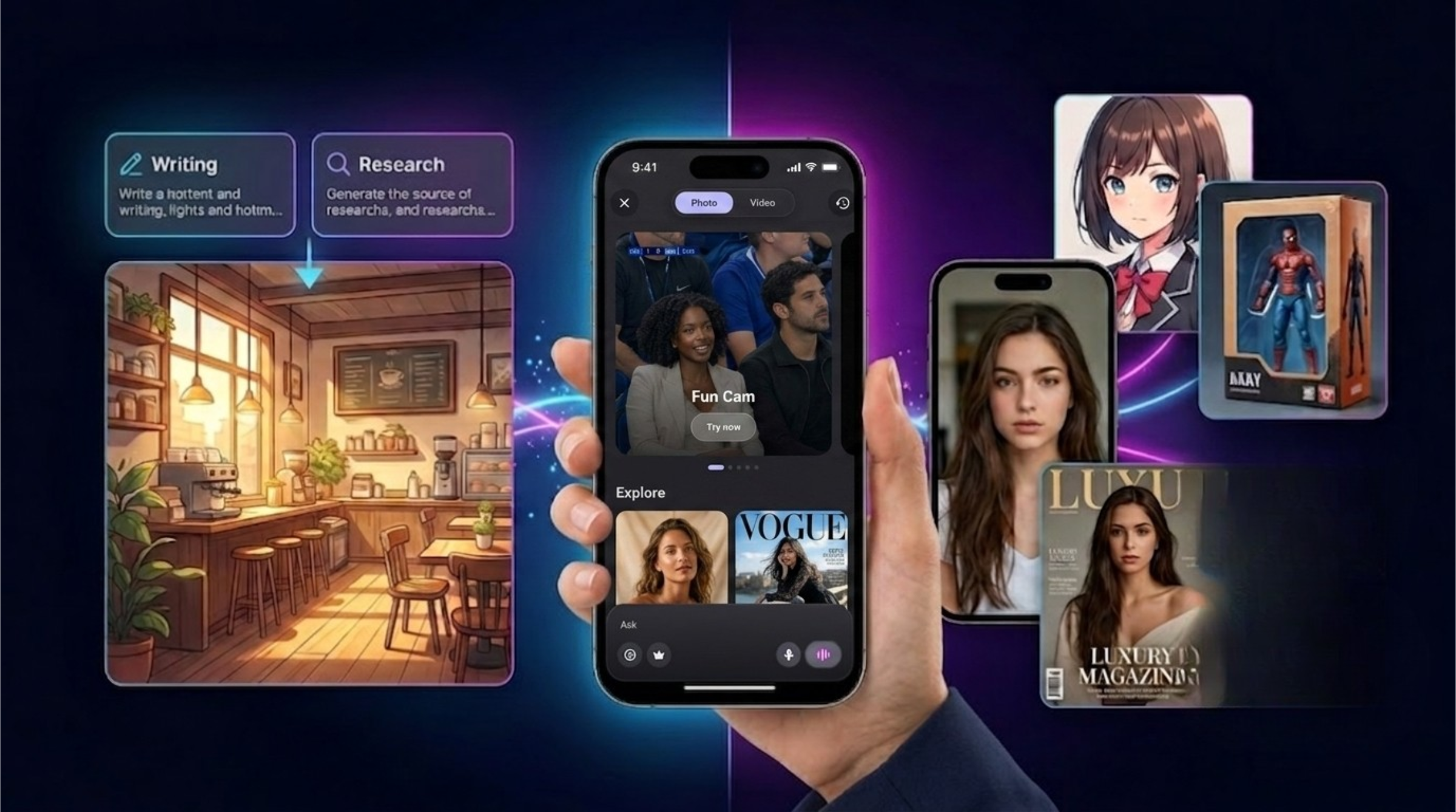
Table of Contents
AI image tools are changing how people create visuals.
A few years ago, creating a high-quality image required design skills, editing software, stock photo websites, or professional help. Today, AI can generate a visual from a simple text prompt or transform an existing photo into a completely different style.
But many users still confuse two important concepts:
AI image generator and AI image transformer.
They sound similar, but they are not the same thing.
An AI image generator creates a new image from text. You describe what you want, and the tool creates a visual from scratch.
An AI image transformer starts with an existing photo and changes it into a new style, format, character, scene, or creative concept.
Both are useful. But they solve different problems.
If you want to create a fantasy landscape, a product concept, a futuristic city, or a social media visual from imagination, you probably need an AI image generator.
If you want to turn your own selfie into an anime character, action figure, sports poster, magazine cover, cinematic portrait, or stylized avatar, you need an AI image transformer.
In this guide, we will explain the difference, show real use cases, compare popular tools, and help you decide which one is better for your creative workflow.
What Is an AI Image Generator?
An AI image generator creates an image from a text prompt.
You write a description, and the tool turns that description into a visual. The better your prompt, the more accurate the result can be.
For example, you can write:
“Create a cinematic photo of a futuristic city at night with neon lights, flying cars, and rainy streets.”
Or:
“Generate a clean product mockup of a smart water bottle on a white background.”
Or:
“Create a cozy coffee shop illustration in warm colors, with a laptop on the table and sunlight coming through the window.”
The tool does not need your personal photo. It creates a new image based on your description.
Popular platforms like Midjourney, ChatGPT Images, Adobe Firefly, Canva, and other visual AI tools are commonly used for this type of image creation. Midjourney is especially known for artistic and highly stylized visual results. ChatGPT Images can generate and refine images through conversation. Adobe Firefly is useful for creative workflows and generative editing. Canva makes image generation accessible inside a broader design platform.
AI image generators are powerful because they help users create something that did not exist before.
What Is an AI Image Transformer?
An AI image transformer starts with an existing image and changes it into something new.
Instead of creating a visual only from text, it uses your uploaded photo as the starting point.
For example, you can upload a selfie and turn it into:
An anime portrait.
A cinematic character poster.
A football star image.
A magazine cover.
A toy box action figure.
A fantasy warrior.
A professional profile image.
A cartoon avatar.
A stylized social media photo.
A futuristic character concept.
This is different from pure text-to-image generation because the user’s original photo matters.
The goal is not only to create a new image. The goal is to preserve something important from the original photo, such as the person, face, pose, clothing, mood, or composition, while transforming the style or scene.
This is why image transformer tools feel more personal.
They are not just creating random visuals. They are turning your own photos into creative outputs.
SuperGeno’s Image Transformer feature is built around this idea. Users can choose from creative templates and transform their own uploaded photos into different styles directly from a mobile-first experience.
AI Image Generator vs Image Transformer: The Simple Difference
The easiest way to understand the difference is this:
An AI image generator starts with an idea.
An AI image transformer starts with your photo.
If you want an image of something that does not exist yet, use a generator.
If you want to transform an existing image into a new style, use a transformer.
Here is a simple comparison:
AI Image Generator
Starts from text.
Creates a new image from scratch.
Best for concepts, ads, scenes, illustrations, and product ideas.
Does not require a personal photo.
Output depends heavily on the prompt.
Useful for imagination-driven visuals.
AI Image Transformer
Starts from an uploaded photo.
Changes the image into a new style or scene.
Best for selfies, portraits, avatars, posters, profile images, and social content.
Requires an existing image.
Output depends on both the photo and the selected style.
Useful for personal, shareable, and template-based visuals.
Both are valuable. But they are useful in different moments.
When Should You Use an AI Image Generator?
Use an AI image generator when you want to create a visual from imagination.
This is useful when you do not already have a photo or when the image you want does not exist.
For example, an AI image generator is a good choice for:
Social media post ideas.
Ad concepts.
Blog hero images.
Product mockups.
Fantasy scenes.
Character concepts.
Background images.
Thumbnails.
Mood boards.
Presentation visuals.
Marketing campaign concepts.
Design inspiration.
Let’s say you are launching a mobile app and need a blog image. You can ask an AI image generator to create a premium hero visual showing a smartphone, floating AI cards, and a futuristic background.
Or maybe you are a creator and need a YouTube thumbnail idea. You can generate several concepts before choosing a direction.
Or maybe you run a small business and need a promotional visual for a new product. Instead of searching stock photos, you can create a custom concept.
This is why tools like Midjourney, ChatGPT Images, Adobe Firefly, and Canva are so popular. They help users move from idea to visual much faster than traditional design workflows.
When Should You Use an AI Image Transformer?
Use an AI image transformer when you already have a photo and want to make it more creative.
This is especially useful for mobile users because most people already have many photos on their phones.
For example, you can transform:
A selfie into an anime-style profile picture.
A casual photo into a professional portrait.
A regular image into a magazine cover.
A person into an action figure.
A photo into a football player poster.
A portrait into a cinematic character.
A pet photo into a stylized illustration.
A travel photo into a fantasy scene.
Image transformers are powerful because they make AI feel personal.
Instead of generating a random character, you can become the character.
Instead of creating a generic poster, you can create a poster with your own photo.
Instead of designing from zero, you can start with a real image and let AI transform it.
This type of feature is especially useful for social media, profile images, fun creative content, personal branding, and viral visual trends.
SuperGeno’s Image Transformer is designed for this kind of experience. Users can select a template, upload a photo, and create a transformed image from their phone without needing complex design software.
Why Image Transformation Is So Popular on Mobile
Mobile users want fast, visual, and personal results.
That is why AI photo transformation is becoming one of the most shareable AI use cases.
People do not always want to write long prompts. They want to choose a style, upload a photo, and see a result.
This behavior is very different from traditional design work.
A designer may enjoy building a prompt from scratch. But a casual user may prefer:
Choose a template.
Upload a selfie.
Tap generate.
Share the result.
This is why image transformer features can work especially well in mobile apps.
They reduce friction.
They make the output personal.
They create content users want to share.
They help people experiment with different identities, styles, and scenes.
They are easy to understand.
For example, “Turn your selfie into an action figure” is much easier to understand than “write a detailed prompt for a cinematic stylized character with product packaging composition.”
The more visual and immediate the experience is, the more likely users are to try it.
Popular AI Image Tools and What They Are Best For
There are many AI image tools, and each one has a different strength.
Midjourney
Midjourney is one of the most recognized names in AI image generation. It is widely used for artistic visuals, cinematic images, concept art, stylized portraits, and creative experimentation.
Best for:
High-quality artistic visuals.
Concept art.
Cinematic scenes.
Stylized portraits.
Creative exploration.
Visual inspiration.
Potential limitation:
It may feel less simple for casual mobile users who want a quick template-based experience.
ChatGPT Images
ChatGPT Images allows users to generate and refine visuals through conversation. This is useful because users can describe what they want, ask for edits, request variations, and continue improving the result naturally. OpenAI describes its image generation as capable of following prompts, using chat context, and transforming uploaded images or using them as visual inspiration.
Best for:
Conversational image generation.
Prompt-based visual creation.
Iterating on image ideas.
Combining text and visual thinking.
Users who already use ChatGPT.
Potential limitation:
Users who mainly want quick mobile photo transformations may prefer a more template-driven flow.
Adobe Firefly
Adobe Firefly is designed for creative workflows and generative editing. It includes features such as Generative Fill and image-to-image creation, making it useful for designers and creators who already work with Adobe products.
Best for:
Creative professionals.
Generative fill.
Image editing.
Design workflows.
Adobe ecosystem users.
Potential limitation:
It may be more than casual users need if they only want fast, fun, mobile-first photo transformations.
Canva
Canva makes AI image generation accessible inside a broader design platform. It offers AI image generation, design tools, Magic Design, editing features, and templates, which makes it useful for social media, presentations, marketing assets, and small business visuals.
Best for:
Social media designs.
Presentations.
Marketing visuals.
Templates.
Small businesses.
Non-designers.
Potential limitation:
It is a broad design platform, so users who only want AI chat, voice, research, documents, and image transformation in one mobile app may still need another tool.
SuperGeno
SuperGeno is built for users who want AI creativity and productivity in one mobile-first experience.
Instead of focusing only on image generation, SuperGeno connects visual creation with chat, writing, web search, PDF summarization, voice chat, and daily productivity.
Its Image Transformer feature is especially useful for users who want to transform their own photos into creative templates.
Best for:
Mobile AI image transformation.
Template-based photo creativity.
AI image generation.
Social media visuals.
Personal avatars.
Fun shareable images.
Writing captions and prompts.
Combining visuals with research, writing, voice, and document workflows.
Potential limitation:
If you are a professional designer who needs advanced manual control, a dedicated design platform may still be useful. But for everyday users who want quick creative results from a phone, SuperGeno is a practical option.
Best Use Cases for AI Image Generators
AI image generators are great when your starting point is an idea.
Here are some practical use cases.
1. Blog Hero Images
Writers, founders, marketers, and small businesses often need blog visuals. Instead of using generic stock photos, AI can create custom hero images that match the topic.
Example prompt:
“Create a premium blog hero image showing a smartphone with floating AI productivity cards, dark gradient background, neon blue and purple highlights, modern mobile app style.”
2. Social Media Visuals
Creators can generate post concepts, story backgrounds, carousel visuals, or campaign ideas.
Example prompt:
“Generate a clean Instagram visual for a productivity app, showing a phone, checklist, and glowing AI assistant interface.”
3. Product Concepts
Founders and product teams can quickly visualize ideas before investing in design.
Example prompt:
“Create a modern product concept image for a smart notebook app with AI-powered notes, minimal interface, and premium lighting.”
4. Presentation Images
Students and professionals can create custom visuals for presentations.
Example prompt:
“Create a simple educational illustration showing how AI helps students summarize documents and prepare study notes.”
5. Creative Campaigns
Marketers can test visual directions before creating final assets.
Example prompt:
“Create three different visual concepts for a mobile AI app campaign: futuristic, friendly, and premium.”
Best Use Cases for AI Image Transformers
AI image transformers are great when your starting point is a photo.
Here are some practical use cases.
1. Profile Pictures and Avatars
Users can transform selfies into professional, artistic, anime, cartoon, or cinematic profile images.
Example prompt:
“Transform this selfie into a clean cinematic profile portrait with soft lighting and a premium modern background.”
2. Social Media Trends
Many viral AI trends are based on photo transformation. Users want to see themselves in different styles, characters, and scenes.
Example prompt:
“Turn this photo into a toy box action figure with premium packaging, studio lighting, and a collectible product style.”
3. Sports Posters
A regular portrait can become a football player poster, basketball card, boxing promo, or championship-style image.
Example prompt:
“Transform this person into a professional football star poster with stadium lights, dramatic energy, and a premium sports campaign look.”
4. Magazine Covers
Users can turn ordinary photos into editorial-style magazine covers.
Example prompt:
“Transform this portrait into a luxury magazine cover photo with elegant lighting, stylish composition, and premium fashion editorial mood.”
5. Character Concepts
Image transformation can turn a person into a fantasy character, sci-fi hero, warrior, singer, racer, or movie-style figure.
Example prompt:
“Transform this person into a cinematic fantasy hero while preserving the face, pose, and main identity of the uploaded photo.”
6. Pet Transformations
Pet owners can transform their pets into cartoons, fantasy characters, toy figures, or illustrated portraits.
Example prompt:
“Transform this dog photo into a cute animated character with soft lighting, playful expression, and colorful background.”
SuperGeno’s Image Transformer is designed to make these use cases easier by offering template-based transformations directly from a mobile app.
Why Templates Matter in AI Photo Transformation
Prompts are powerful, but not every user wants to write detailed prompts.
This is where templates become important.
A template gives users a clean creative direction. Instead of writing a complex prompt, the user can choose a style and upload a photo.
For example:
Anime Portrait.
Action Figure.
Football Star.
Magazine Cover.
Cinematic Hero.
Cartoon Avatar.
Professional Portrait.
Fantasy Character.
This makes the experience easier.
Templates help users understand what they will get.
They reduce prompt-writing effort.
They make the result more predictable.
They are easier to share.
They work well for mobile users.
They can support viral trends.
For casual users, templates are often more attractive than blank prompt boxes.
A blank prompt box can feel intimidating. A template gallery feels fun, visual, and easy to try.
This is one of the reasons SuperGeno’s Image Transformer can be valuable. It turns AI photo editing into a simpler mobile experience: choose a template, upload a photo, and create.
AI Image Generator or Image Transformer: Which One Is Better?
Neither one is better in every situation.
The better choice depends on what you want to create.
Choose an AI image generator if:
You want to create something from imagination.
You do not have a starting photo.
You need a custom concept.
You are creating blog or ad visuals.
You want a scene, object, product, or illustration.
You enjoy writing prompts.
Choose an AI image transformer if:
You want to transform your own photo.
You want a personal avatar or profile image.
You want social media-friendly content.
You want a fast mobile experience.
You prefer templates over complex prompts.
You want to preserve identity while changing style.
In many cases, the best workflow uses both.
For example, a creator might use an AI image generator to create a background concept and an image transformer to stylize a personal portrait.
A marketer might generate an ad concept and then transform a product photo to match the campaign style.
A student might create a presentation image from text and transform a profile photo for a project cover.
This is why all-in-one tools are becoming more useful. Users do not want to think about which technical category they need. They simply want to create.
How SuperGeno Combines Image Generation and Image Transformation
SuperGeno is designed as a mobile-first AI tool that brings several creative and productivity workflows together.
For visual creation, SuperGeno can help users:
Generate images from ideas.
Transform uploaded photos with templates.
Create social media-ready visuals.
Brainstorm image prompts.
Write captions for generated images.
Use AI chat to refine creative direction.
Search for inspiration.
Summarize ideas from documents and turn them into visuals.
Use voice chat to brainstorm creative concepts.
This matters because visual creation is rarely isolated.
A social media creator may need an idea, caption, image, and hashtag direction.
A founder may need a campaign concept, ad visual, and landing page copy.
A student may need a visual for a presentation and a short explanation.
A freelancer may need to create a proposal, social post, and visual reference.
Instead of using Midjourney for images, Canva for design, ChatGPT for captions, and another app for mobile brainstorming, SuperGeno brings many everyday creative needs into one simple mobile interface.
Practical Workflows You Can Try
Here are simple workflows that show how AI image generation and image transformation can work together.
Workflow 1: Create a Social Media Post
Start with an idea:
“Create five post ideas for a mobile AI assistant.”
Choose one idea.
Generate a visual concept:
“Create an image concept for this post with a smartphone and futuristic AI cards.”
Write the caption:
“Write a short Instagram caption for this visual.”
Create variations:
“Make it more playful.”
“Make it more premium.”
“Make it shorter.”
This workflow combines brainstorming, image generation, and writing.
Workflow 2: Transform a Selfie into a Profile Image
Upload your photo.
Choose a template such as cinematic portrait, professional headshot, anime avatar, or magazine cover.
Generate the transformed image.
Ask AI to write a caption:
“Write a short profile caption for this new avatar.”
This workflow is simple and mobile-friendly.
Workflow 3: Create a Campaign Concept
Ask:
“Give me three campaign ideas for an AI productivity app.”
Choose a campaign angle.
Generate a hero image.
Transform a user photo into a campaign-style portrait.
Write ad copy and social captions.
This is useful for marketers, app owners, and small businesses.
Workflow 4: Build a Personal Brand Visual
Upload a portrait.
Transform it into a clean professional style.
Ask:
“Write a short profile headline for this new look.”
Generate a short bio.
Create a matching banner idea.
This is useful for freelancers, founders, creators, and professionals.
Workflow 5: Turn a Photo into Viral Content
Upload a selfie or pet photo.
Choose a fun transformation template.
Generate the image.
Ask AI:
“Write a funny caption for this image.”
“Create three TikTok post ideas using this transformation.”
This is useful because visual AI often works best when paired with text and content ideas.
Common Mistakes to Avoid
AI image tools are powerful, but users often make a few mistakes.
Mistake 1: Using vague prompts
A prompt like “make a cool image” is usually too broad.
Better:
“Create a cinematic mobile app hero image with a smartphone, floating AI feature cards, dark gradient background, and premium neon lighting.”
Mistake 2: Expecting perfect results on the first try
AI image creation is often iterative. Generate, review, adjust, and try again.
Mistake 3: Choosing the wrong tool
If you want a personal avatar, use a photo transformer. If you want a brand-new scene, use an image generator.
Mistake 4: Ignoring the original photo quality
For image transformation, the uploaded photo matters. Clear lighting, visible face, and simple composition usually help.
Mistake 5: Forgetting the final use case
An image for Instagram, a blog hero, a profile picture, and an ad campaign may all need different formats, styles, and compositions.
Mistake 6: Not reviewing commercial usage
If you use AI visuals for ads, branding, client work, or paid campaigns, review quality, rights, originality, and platform rules carefully.
Prompt Examples for Better AI Images
Here are practical prompt examples you can adapt.
Blog Hero Image Prompt
“Create a premium blog hero image showing a smartphone with floating AI cards for writing, research, image generation, voice chat, and PDF summarization. Use a dark gradient background with neon blue and purple lighting. Make it clean, modern, mobile-first, and professional.”
Social Media Visual Prompt
“Create a square Instagram visual for an AI productivity app. Show a modern phone interface, glowing assistant bubble, checklist icons, and a clean futuristic background. Use a friendly and premium style.”
Product Campaign Prompt
“Create a high-quality campaign visual for a mobile AI app that helps users write, search, summarize, create images, and use voice chat. Show a smartphone in the center with soft neon lighting and clear feature cards around it.”
Image Transformer Prompt for Profile Photo
“Transform this uploaded portrait into a cinematic professional profile image. Preserve the person’s face and identity. Use soft studio lighting, a clean premium background, and a confident modern look.”
Image Transformer Prompt for Action Figure Style
“Transform this uploaded person into a collectible toy box action figure. Preserve the face and main identity. Add premium packaging, studio lighting, detailed accessories, and a fun product photography style.”
Image Transformer Prompt for Sports Poster
“Transform this uploaded person into a professional football star poster. Preserve the face and identity. Add stadium lights, dramatic sports energy, realistic jersey details, and a premium campaign look.”
Image Transformer Prompt for Magazine Cover
“Transform this uploaded portrait into a luxury magazine cover image. Preserve the person’s face and pose. Use elegant lighting, stylish composition, editorial fashion mood, and premium cover photography.”
Final Thoughts: AI Image Generation Creates Ideas, Image Transformation Makes Them Personal
AI image generators and AI image transformers are both powerful, but they are not the same.
An AI image generator is best when you want to create something from imagination.
An AI image transformer is best when you want to turn your own photo into something new.
If you are a marketer, creator, student, founder, freelancer, or small business owner, both can save time and unlock creative ideas.
Tools like Midjourney, ChatGPT Images, Adobe Firefly, and Canva are strong options for different parts of the visual creation process. Midjourney is known for creative image generation. ChatGPT Images is useful for conversational visual creation and refinement. Adobe Firefly is strong for generative editing and design workflows. Canva is practical for templates and accessible design.
But if you want a mobile-first tool that combines image generation, image transformation, writing, web search, PDF summarization, voice chat, and everyday productivity, SuperGeno is worth trying.
SuperGeno helps you move from idea to image, from photo to transformation, and from visual to content in one simple mobile app.
Instead of switching between several separate products, you can generate, transform, write, brainstorm, and create from your phone.
That is the future of practical AI creativity: not only making images, but making the entire creative workflow easier.
Best AI Chat Apps in 2026: How to Choose the Right AI Tool for Your Daily Workflow
Discover the best AI chat apps in 2026 for writing, research, image generation, voice chat, PDF summarization, studying, and mobile productivity.
Best AI Tools for Writing, Research, and Everyday Tasks in 2026
Discover the best AI tools for writing, research, PDF summarization, image generation, voice chat, studying, creativity, and everyday productivity in 2026.